> ## Documentation Index
> Fetch the complete documentation index at: https://docs.athina.ai/llms.txt
> Use this file to discover all available pages before exploring further.
# Running Evals
The easiest way to get started is to follow this
[notebook](https://github.com/athina-ai/athina-evals/blob/main/examples/run_experiment.ipynb)
#### 1. Configure API Keys[](#1-configure-api-keys)
Evals use OpenAI, so you need to configure your OpenAI API key.
If you wish to view the results on [Athina Develop](https://docs.athina.ai/develop), and maintain a historical record of prompts and experiments you run during your development workflow, then you also need an Athina API Key.
```python
from athina.keys import AthinaApiKey, OpenAiApiKey
OpenAiApiKey.set_key(os.getenv('OPENAI_API_KEY'))
AthinaApiKey.set_key(os.getenv('ATHINA_API_KEY')) # optional
```
#### 2. Load your dataset[](#2-load-your-dataset)
[Loading a dataset](api-reference/evals/loading-data/loading-data-for-eval) is quite straightforward - we support JSON and CSV formats.
```python
from athina.loaders import Loader
# Load the data from JSON, Athina or Dictionary
dataset = Loader().load_json(json_file)
```
#### 3. Run an eval on a dataset[](#3-run-an-eval-on-a-dataset)
Running evals on a batch of datapoints is the most effective way to rapidly iterate as you're developing your model.
```python
from athina.evals import ContextContainsEnoughInformation
# Run the ContextContainsEnoughInformation evaluator on the dataset
ContextContainsEnoughInformation(
model="gpt-4-1106-preview",
max_parallel_evals=5, # optional, speeds up evals
).run_batch(dataset).to_df()
```
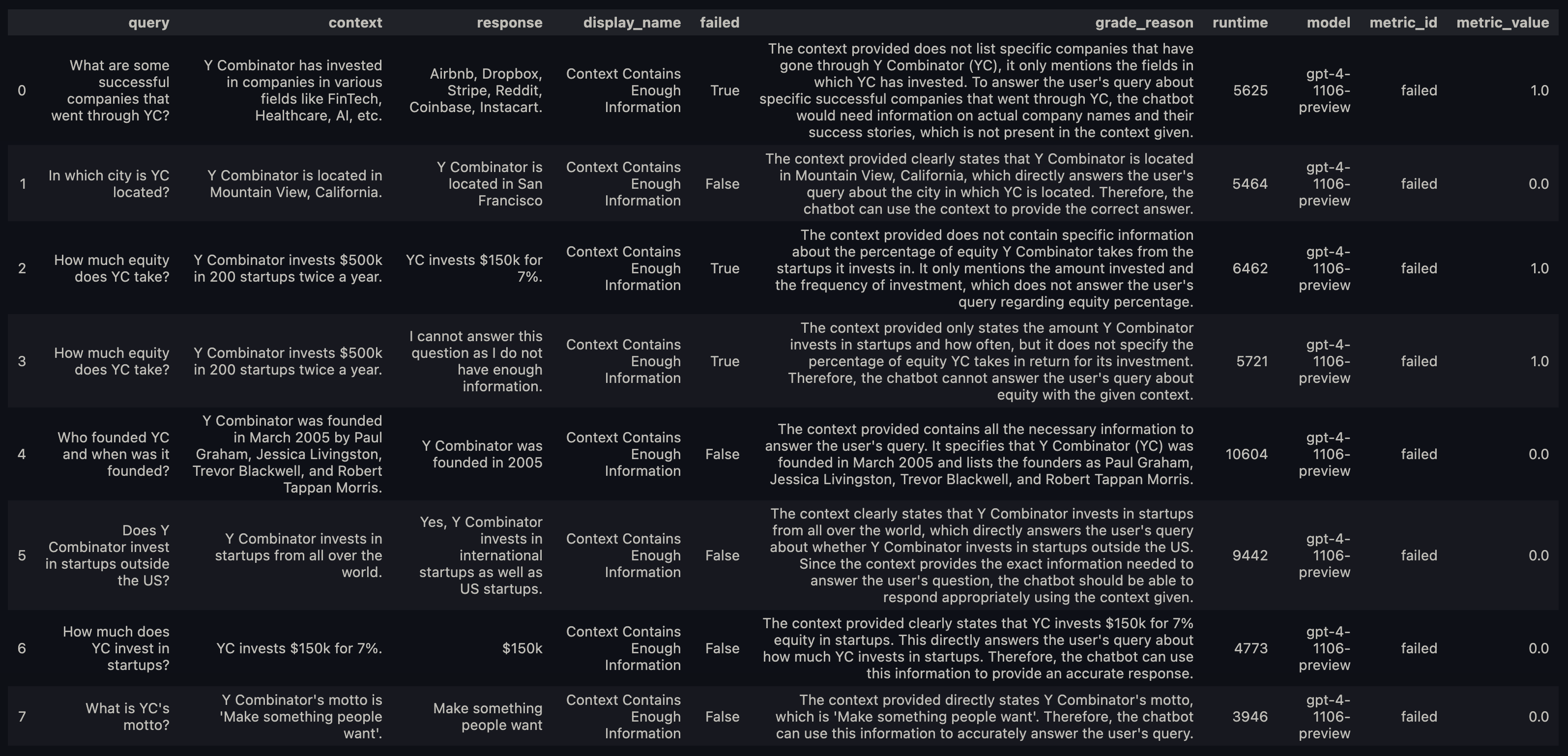
Your results will be printed out as a dataframe that looks like this.
***
#### How do I know which fields I need in my dataset?[](#how-do-i-know-which-fields-i-need-in-my-dataset)
For the [RAG Evals](api-reference/evals/preset-evals/rag), we need 3 fields: query, context, and response.
For these evals, you should use the [RagLoader](https://github.com/athina-ai/athina-evals/blob/main/athina/loaders/rag_loader.py) to load your data. This will ensure the data is in the right format for evals.
Every evaluator has a `REQUIRED_ARGS` property that defines the parameters it expects.
If you pass the wrong parameters, the evaluator will raise a `ValueError` telling you what params you are missing.
For example:, the [`Faithfulness` ](https://github.com/athina-ai/athina-evals/blob/main/athina/evals/llm/faithfulness/evaluator.py) evaluator expects `response` and `context` fields.
***
#### Run an eval on a single datapoint[](#run-an-eval-on-a-single-datapoint)
Running an eval on a single datapoint is very simple.
This might be useful if you are trying to run the eval immediately after inference.
```python
# Run the answer relevance evaluator
# Checks if the LLM response answers the user query sufficiently
DoesResponseAnswerQuery().run(query=query, response=response)
```
Here's a [notebook ](https://github.com/athina-ai/athina-evals/blob/main/examples/run_one.ipynb) you can use to get started.