> ## Documentation Index
> Fetch the complete documentation index at: https://docs.athina.ai/llms.txt
> Use this file to discover all available pages before exploring further.
# Get Data from S3 Bucket
> Step-by-step guide on retrieving S3 data in to Athina.
Amazon S3 (Simple Storage Service) is widely used for storing both structured and unstructured data. If you have datasets stored in an S3 bucket and want to use them in Athina IDE for evaluation or experimentation, this guide will walk you through the step-by-step process of fetching data from S3 and adding it to Athina IDE datasets using Python.
## Steps
### Step 1: Install Required Libraries
Before you begin, install the necessary Python libraries:
```bash
pip install boto3 pandas athina-client
```
### Step 2: Configure AWS S3 Credentials
Set up AWS credentials using environment variables for security:
```python
import os
import boto3
import pandas as pd
from io import StringIO
# Set AWS credentials
os.environ["ACCESS_KEY_ID"] = "your-access-key-id"
os.environ["SECRET_ACCESS_KEY"] = "your-secret-access-key"
# Initialize the S3 client
s3 = boto3.client(
's3',
aws_access_key_id=os.environ["ACCESS_KEY_ID"],
aws_secret_access_key=os.environ["SECRET_ACCESS_KEY"]
)
# Define the S3 bucket and file key
BUCKET_NAME = "your-bucket-name"
FILE_KEY = "your-dataset.json" # Change the file format accordingly
```
### Step 3: Retrieve Data from S3 and Load into Pandas
Now, let's fetch the file from S3, read its content, and convert it into a Pandas DataFrame:
```python
try:
# Fetch the file from S3
obj = s3.get_object(Bucket=BUCKET_NAME, Key=FILE_KEY)
data = obj['Body'].read().decode('utf-8')
# Convert JSON data to Pandas DataFrame
df = pd.read_json(StringIO(data))
print("S3 Data Successfully Loaded!")
except s3.exceptions.NoSuchKey:
print("The specified object does not exist in the bucket.")
except Exception as e:
print(f"Error retrieving S3 data: {e}")
```
💡 If your file is in CSV format, replace `pd.read_json()` with `pd.read_csv(StringIO(data))`.
### Step 4: Upload Data to Athina IDE
To upload the retrieved data into Athina IDE, follow these steps:
1. Set up the Athina API key
2. Convert the DataFrame into a format suitable for Athina IDE
3. Upload the dataset using `Dataset.add_rows()`
```python
# Import Athina client
from athina_client.datasets import Dataset
from athina_client.keys import AthinaApiKey
# Set your Athina API Key
AthinaApiKey.set_key('your-athina-api-key')
# Upload DataFrame to Athina Dataset
try:
Dataset.add_rows(
dataset_id='your-dataset-id', # Replace with the correct dataset ID from Athina IDE
rows=df.to_dict(orient="records") # Convert DataFrame to a list of dictionaries
)
print("Data successfully uploaded to Athina!")
except Exception as e:
print(f"Failed to add rows to Athina IDE: {e}")
```
Then, go to the **Datasets** section to verify that the data has been uploaded successfully.
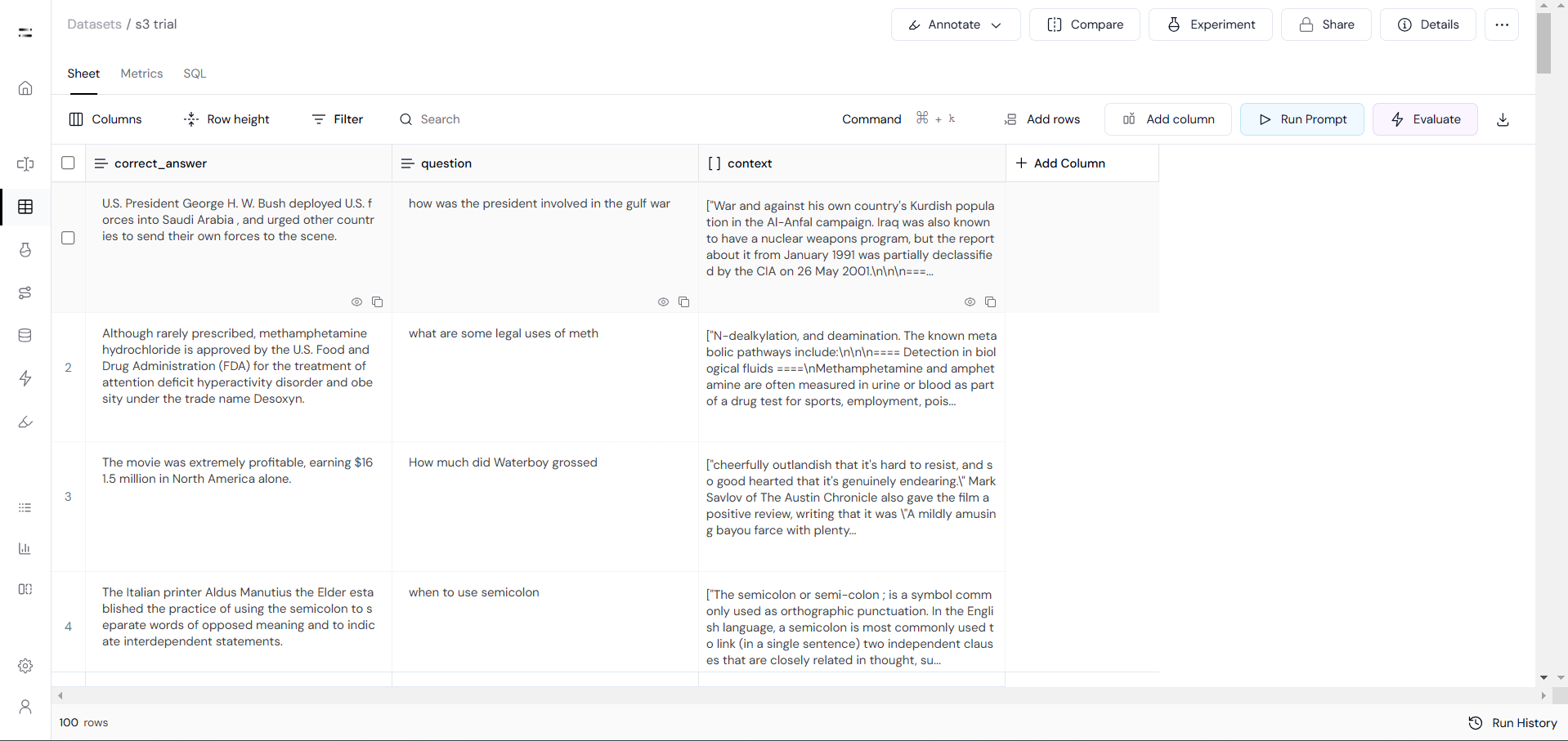 By following this guide, you can retrieve data from an S3 bucket and upload it to Athina IDE for further analysis, evaluation, and experimentation. This integration allows you to efficiently work with large-scale datasets stored in Amazon S3, making it easier to process and analyze data using Athina IDE.