> ## Documentation Index
> Fetch the complete documentation index at: https://docs.athina.ai/llms.txt
> Use this file to discover all available pages before exploring further.
# Pairwise Evaluation
> Step by step pairwise evaluation guide to compare model outputs using Athina AI.
## Introduction
A common key challenge in developing or improving prompts and models is determining whether a new configuration performs better than an existing one. Pairwise evaluation addresses this by comparing two responses side by side based on specific criteria such as relevance, accuracy, or fluency.
Traditionally conducted by human reviewers, this process can be time-consuming, costly, and subjective. Tools like Athina AI automate pairwise evaluation using LLMs, making it faster, scalable, and more efficient. This guide explains what pairwise evaluation is, where it can be used, and how to perform it using Athina AI.
Let’s start by understanding what pairwise evaluation is.
## What is Pairwise Evaluation?
Pairwise evaluation is a method for comparing two outputs from different prompts or models to determine which performs better. This comparison is based on criteria such as relevance, accuracy, or fluency. For example, you can compare responses from an old and a new model to identify improvements.
This method is widely used by AI teams as part of their evaluation processes. While traditionally conducted by human reviewers, pairwise evaluation can also be automated using LLMs, provided the grading criteria are well-defined. Using automated tools like Athina, you can evaluate more efficiently and at a larger scale, with less subjectivity.
## Where to Use Pairwise Evaluation?
Pairwise evaluation is highly versatile and can be applied in various scenarios, including:
1. **Comparing Models**: Compare outputs before and after fine-tuning to determine if the updates improved performance.
2. **Prompt Optimization**: Test different prompt configurations to identify the one that delivers the best results.
3. **Application Development**: Evaluate model outputs for use cases like chatbots, virtual assistants, and customer service systems to ensure they meet quality standards.
4. **Feature Testing**: Assess the impact of new features or model versions by directly comparing them to previous versions.
5. **Quality Assurance**: Identify and address potential issues like relevance gaps, factual inaccuracies, or unclear responses in generated outputs.
By applying pairwise evaluation in these areas, teams can make informed decisions and ensure continuous improvement.
## Dataset
In this guide, we will perform a pairwise evaluation on the **Ragas WikiQA** dataset, which contains questions, context, and ground truth answers. This dataset is generated using information from Wikipedia pages.
## Pairwise Evaluation in Athina AI
Now let’s see the step-by-step process of creating pairwise evaluation in Athina AI:
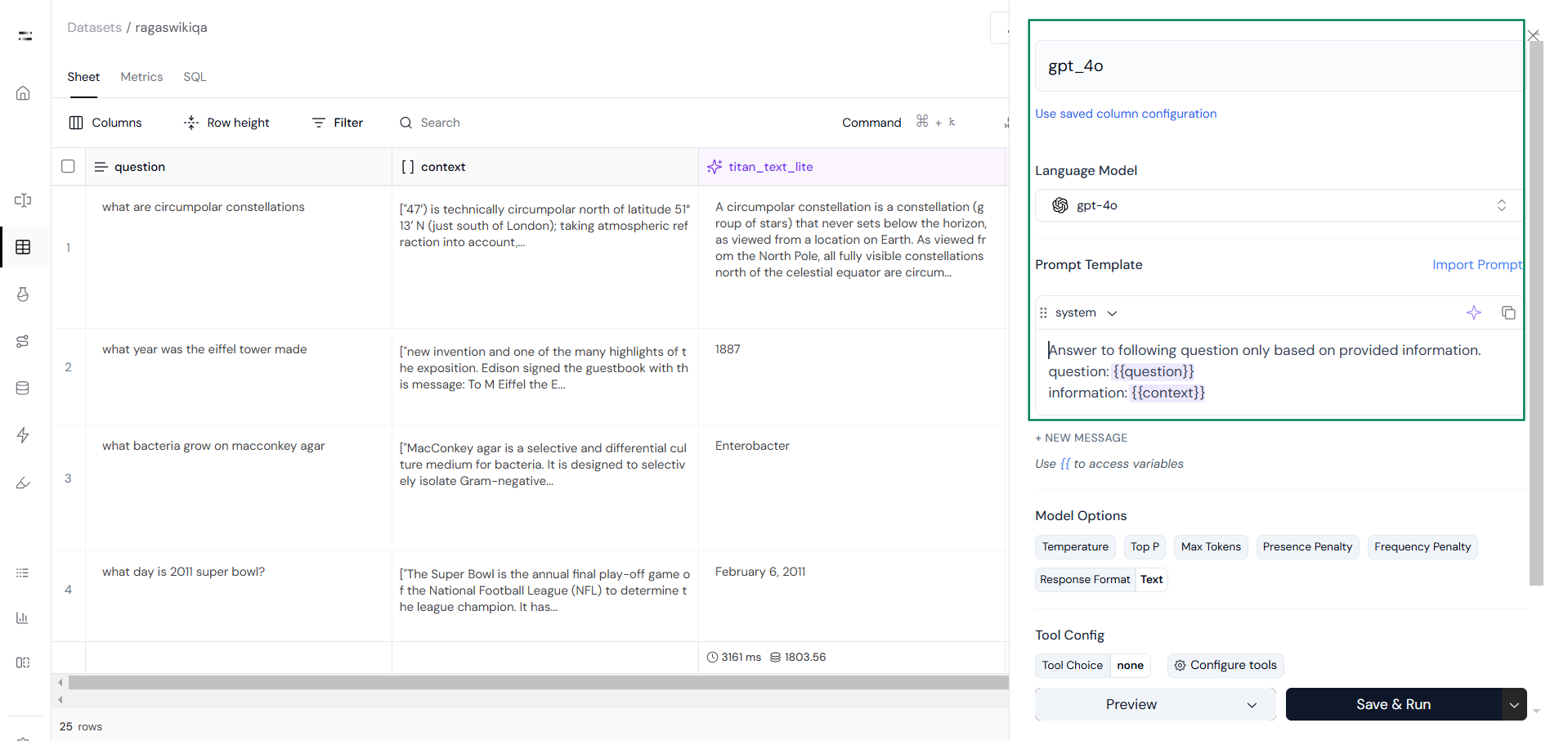
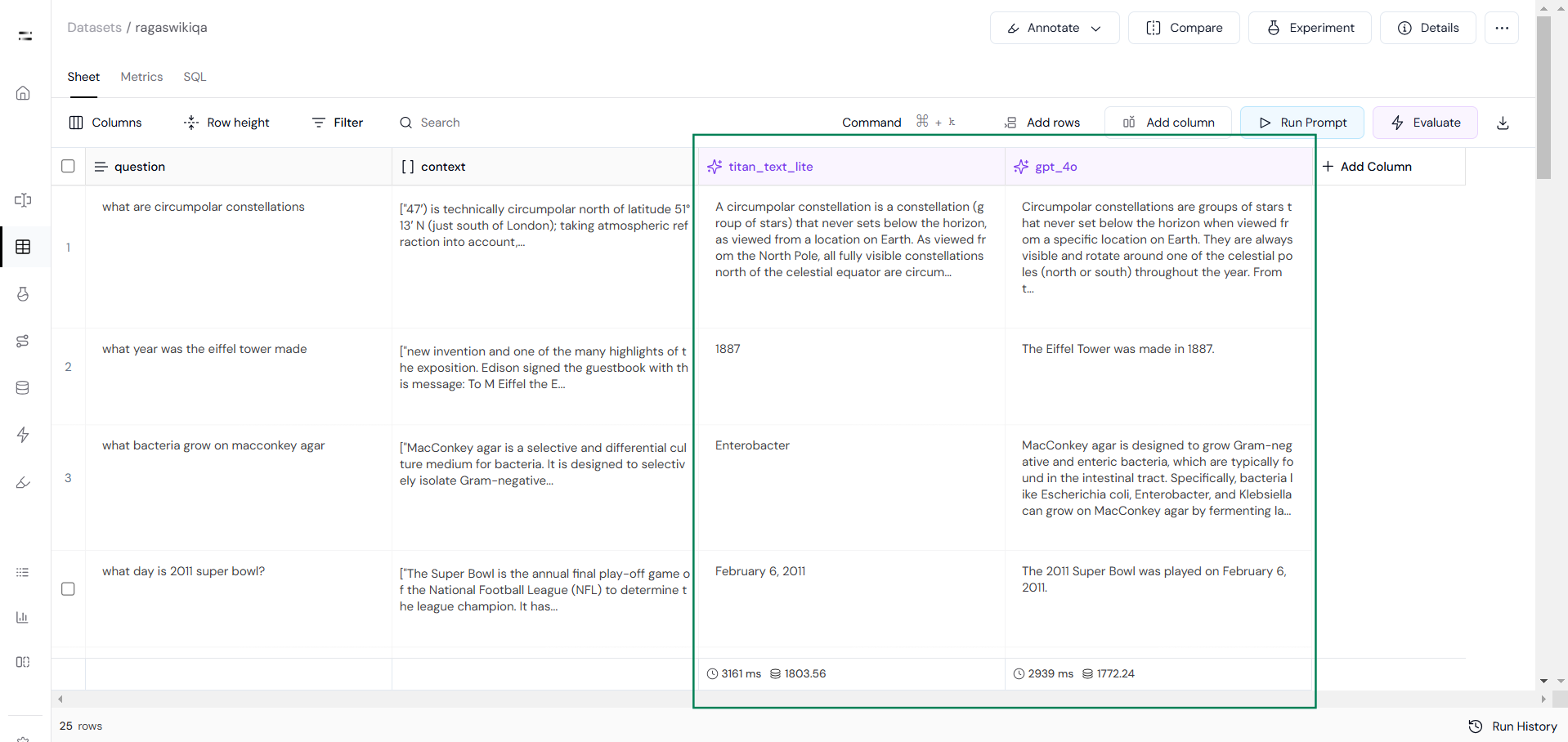
### Step 1: Generate Response Sets
Start by creating two sets of responses using two different models as you can see in the following images.
**Run Prompt** to generate responses:
 Output from both models will look something like this:
 ### Step 2: Define Evaluation Criteria
Next, click on the **Evaluate** feature, then select **Create New Evaluation** and choose the **Custom Eval** option.
### Step 2: Define Evaluation Criteria
Next, click on the **Evaluate** feature, then select **Create New Evaluation** and choose the **Custom Eval** option.
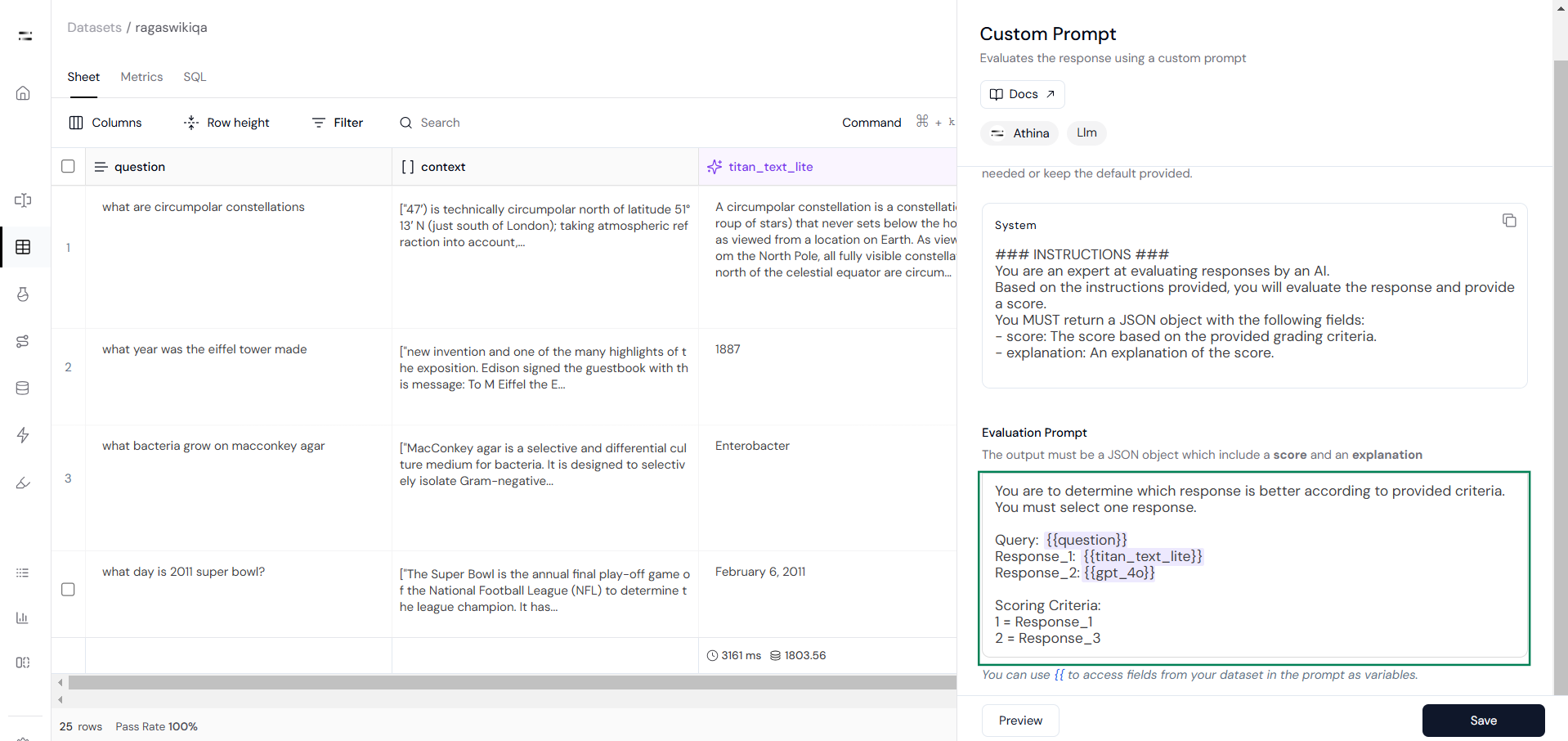
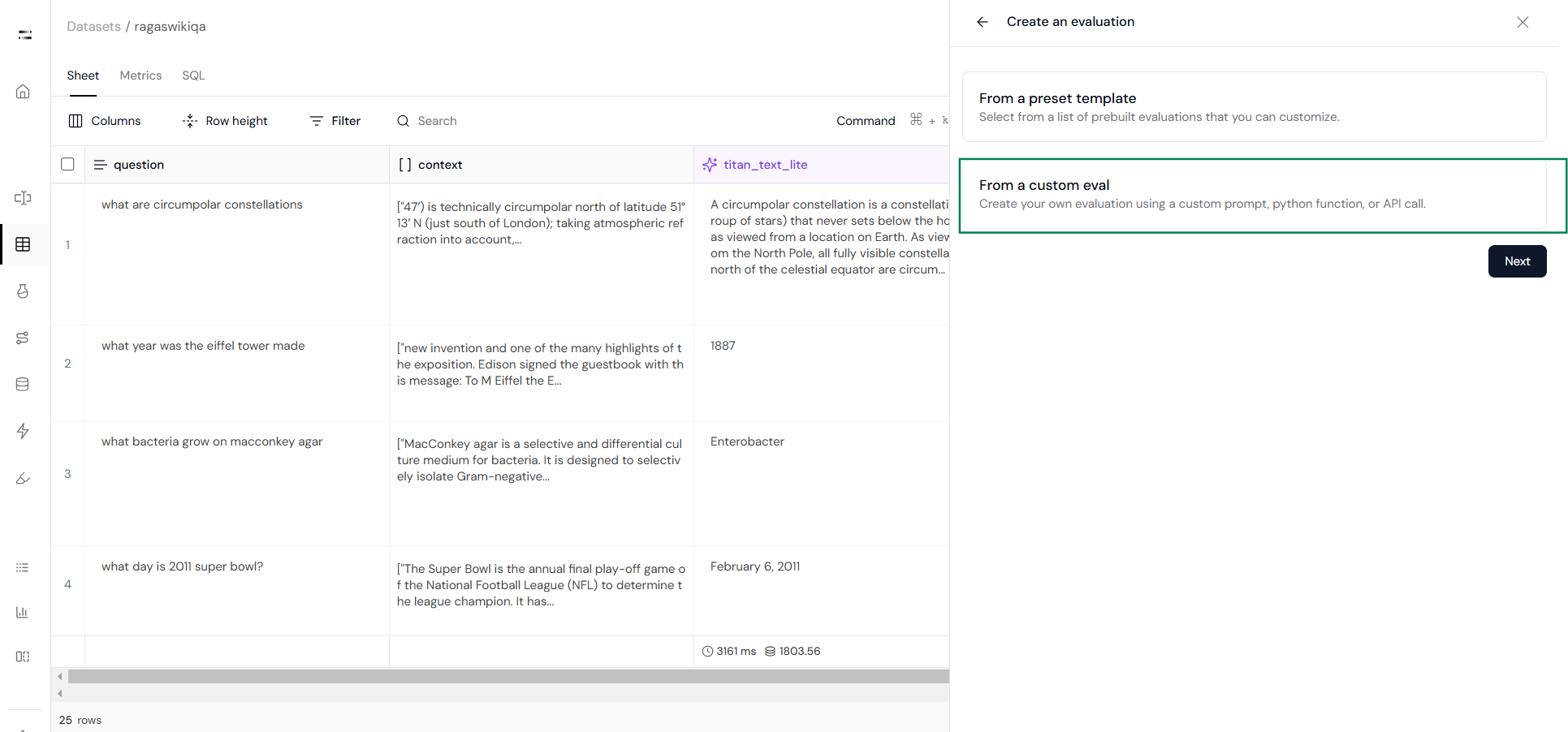 Then click on the custom prompt option as you can see below:
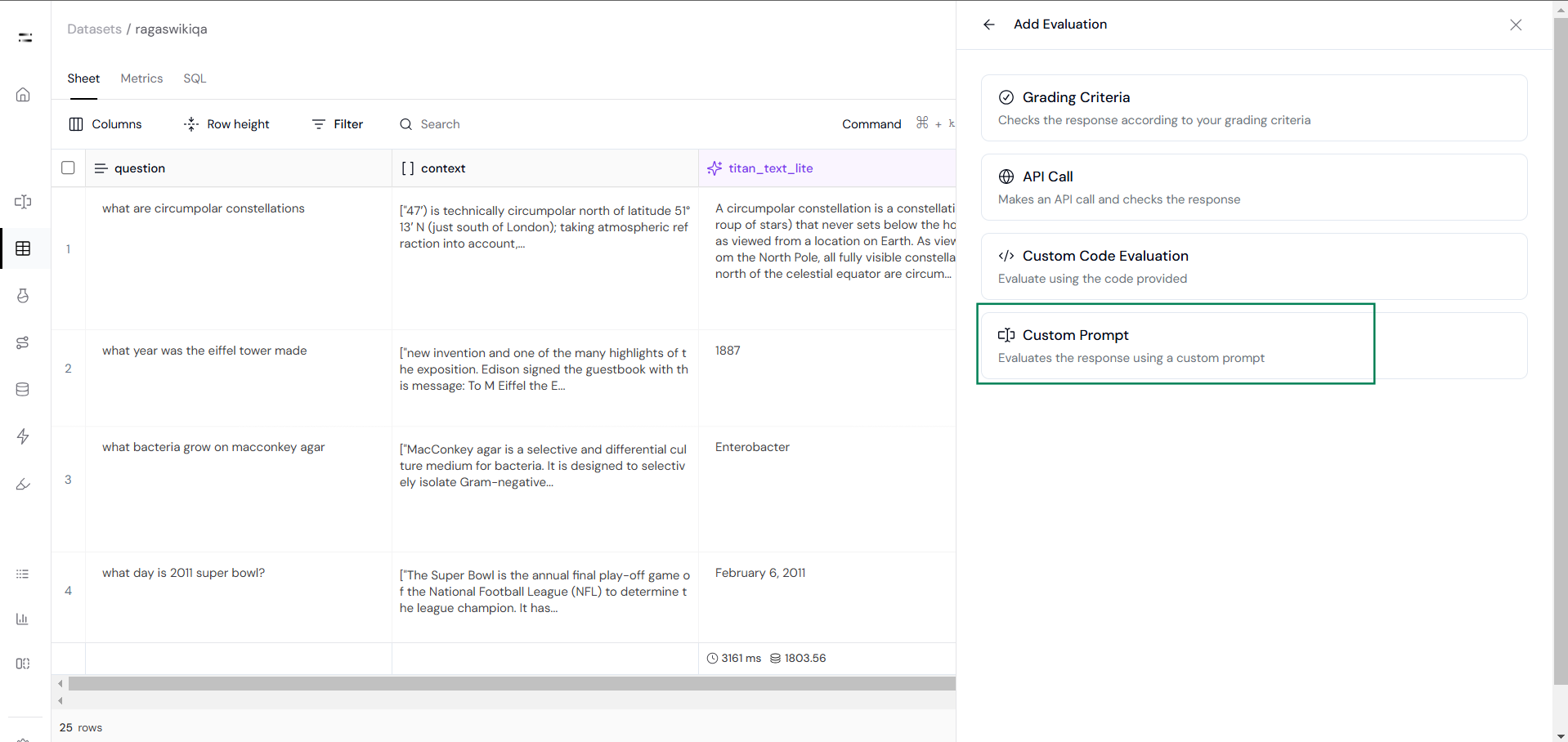 Now define your pairwise evaluation prompt. For example, if the model 1 response is better, then return 1, and if the model 2 response is better, then return 2.
Here is a sample pairwise evaluation prompt:
```python
Eval Prompt:
You are to determine which response is better according to the provided criteria.
You must select one response.
Query: {{question}}
Response_1: {{titan_text_lite}}
Response_2: {{gpt_4o}}
Scoring Criteria:
1 = Response_1
2 = Response_2
```
Set the output type to "String" to ensure it generates accurate scores, as shown in Step 3.
Now define your pairwise evaluation prompt. For example, if the model 1 response is better, then return 1, and if the model 2 response is better, then return 2.
Here is a sample pairwise evaluation prompt:
```python
Eval Prompt:
You are to determine which response is better according to the provided criteria.
You must select one response.
Query: {{question}}
Response_1: {{titan_text_lite}}
Response_2: {{gpt_4o}}
Scoring Criteria:
1 = Response_1
2 = Response_2
```
Set the output type to "String" to ensure it generates accurate scores, as shown in Step 3.
 ### Step 3: Run the Evaluation
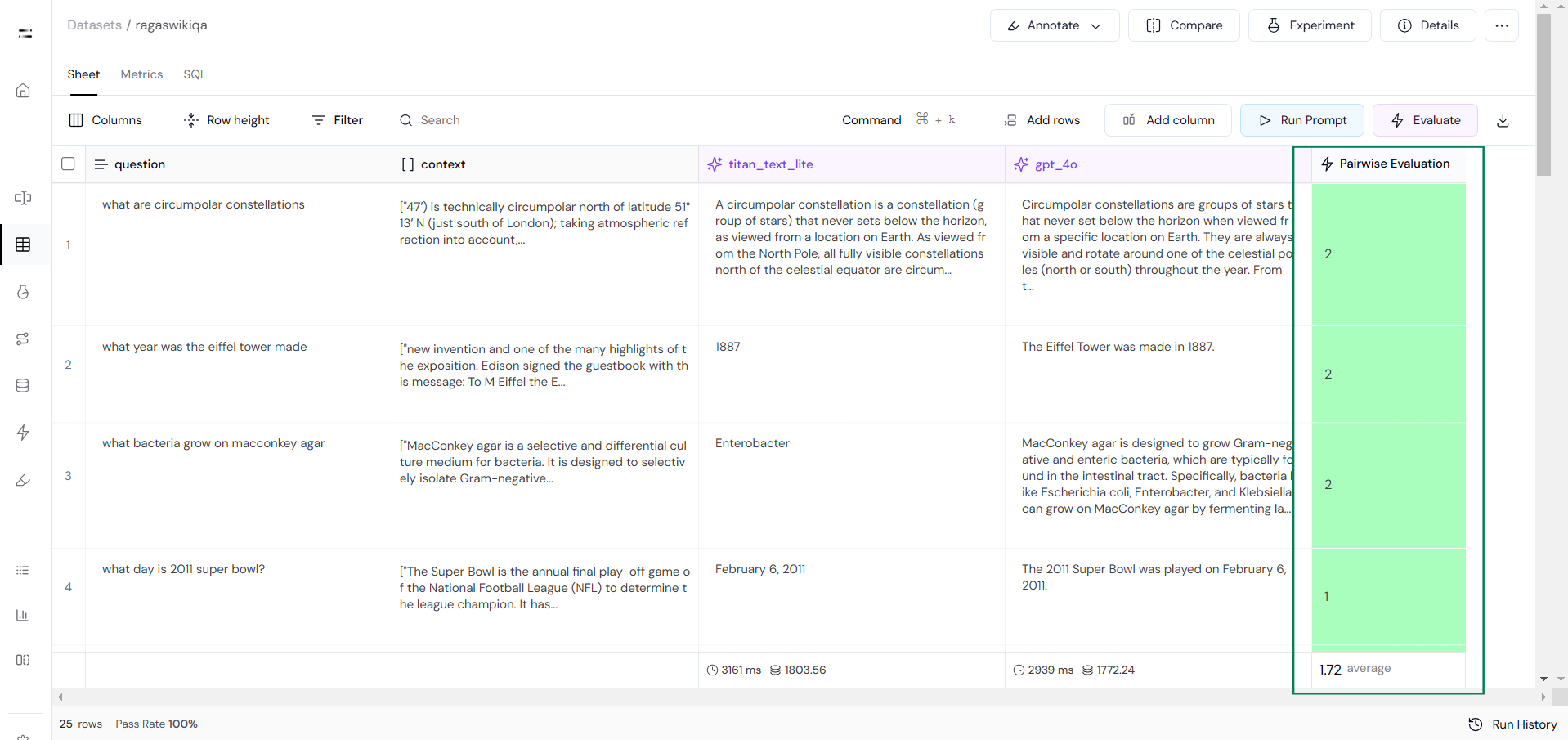
Then, run the evaluation to compare each pair of responses based on the defined criteria.
### Step 3: Run the Evaluation
Then, run the evaluation to compare each pair of responses based on the defined criteria.
 ### Step 4: Compare Results
Once the evaluation is complete, go to the **SQL Section** to view and compare the scores. This analysis will help you determine which model performed better across the dataset.
### Step 4: Compare Results
Once the evaluation is complete, go to the **SQL Section** to view and compare the scores. This analysis will help you determine which model performed better across the dataset.
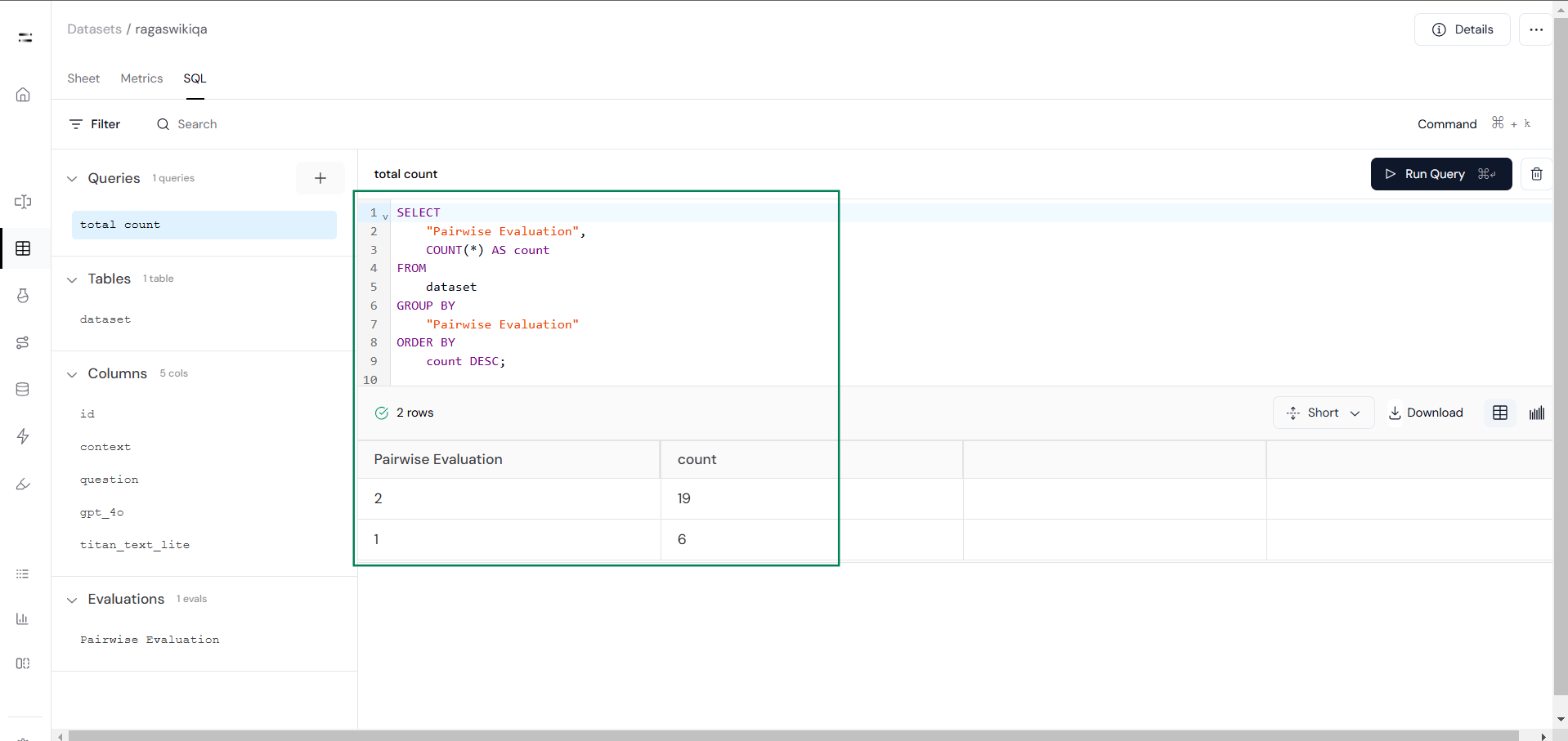 Use these results to refine your prompts, adjust evaluation criteria, or select the best-performing model.
Also, consider metrics like Model Tokens and Latency from the Metrics Section for a more comprehensive evaluation.
Pairwise evaluation is a simple yet powerful way to compare and improve model or prompt configurations. By following these steps in Athina AI, you can efficiently analyze performance, make data-driven adjustments, and refine your approach for better results. This process ensures your models are optimized for relevance, accuracy, and clarity while saving time and resources.
Use these results to refine your prompts, adjust evaluation criteria, or select the best-performing model.
Also, consider metrics like Model Tokens and Latency from the Metrics Section for a more comprehensive evaluation.
Pairwise evaluation is a simple yet powerful way to compare and improve model or prompt configurations. By following these steps in Athina AI, you can efficiently analyze performance, make data-driven adjustments, and refine your approach for better results. This process ensures your models are optimized for relevance, accuracy, and clarity while saving time and resources.