

- Install packages
- Make network requests
- Access variables from previous blocks
- Export variables to be used in subsequent blocks
Limitations
- The execution time is limited to 5 minutes.
- The environment resets after each execution, so any installed packages or variables are not retained.
- Startup latency is ~200ms.
Example Code Snippet
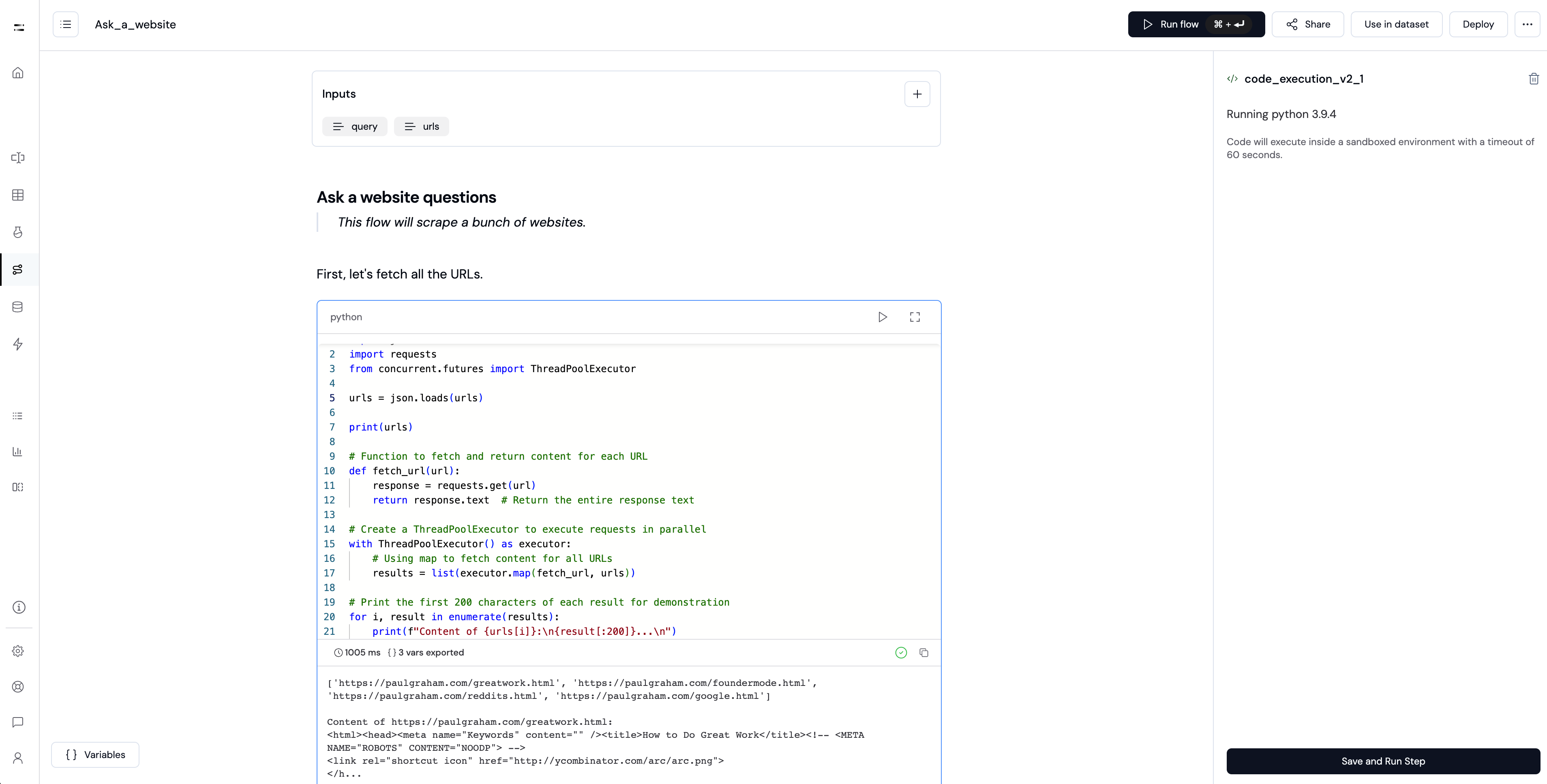
Here is a simple example of using the Code Execution block:import json
import requests
from concurrent.futures import ThreadPoolExecutor
urls = ["https://paulgraham.com/reddits.html"]
print(urls)
# Function to fetch and return content for each URL
def fetch_url(url):
response = requests.get(url)
return response.text # Return the entire response text
# Create a ThreadPoolExecutor to execute requests in parallel
with ThreadPoolExecutor() as executor:
# Using map to fetch content for all URLs
results = list(executor.map(fetch_url, urls))
# Print the first 200 characters of each result for demonstration
for i, result in enumerate(results):
print(f"Content of {urls[i]}:\n{result[:200]}...\n")
Executing Commands
You can execute commands like installing packages using the! operator before the command.
!pip install requests
Keep commands in a separate block from code.
Packages
Several common packages are installed by default.requestspandasjson
import requests
import pandas
import json
Pre-installed Packages
Package                   Version
------------------------- --------------
aiohttp                   3.9.3
aiosignal                 1.3.1
annotated-types           0.7.0
anyio                     4.6.2.post1
argon2-cffi               23.1.0
argon2-cffi-bindings      21.2.0
arrow                     1.3.0
asttokens                 2.4.1
async-timeout             4.0.3
attrs                     24.2.0
audioread                 3.0.1
bash_kernel               0.9.3
beautifulsoup4            4.12.3
bleach                    6.2.0
blis                      0.7.11
bokeh                     3.3.4
catalogue                 2.0.10
certifi                   2024.8.30
cffi                      1.17.1
charset-normalizer        2.0.12
click                     8.1.7
cloudpathlib              0.16.0
comm                      0.2.2
confection                0.1.5
contourpy                 1.3.1
cycler                    0.12.1
cymem                     2.0.10
debugpy                   1.8.9
decorator                 5.1.1
defusedxml                0.7.1
e2b-charts                0.0.2
et_xmlfile                2.0.0
exceptiongroup            1.2.2
executing                 2.1.0
fastjsonschema            2.21.0
fonttools                 4.55.0
fqdn                      1.5.1
frozenlist                1.5.0
gensim                    4.3.2
idna                      3.10
imageio                   2.34.0
iniconfig                 2.0.0
ipykernel                 6.29.3
ipython                   8.22.2
isoduration               20.11.0
jedi                      0.19.2
Jinja2                    3.1.4
joblib                    1.3.2
jsonpointer               3.0.0
jsonschema                4.23.0
jsonschema-specifications 2024.10.1
jupyter_client            8.6.3
jupyter_core              5.7.2
jupyter-events            0.10.0
jupyter_server            2.13.0
jupyter_server_terminals  0.5.3
jupyterlab_pygments       0.3.0
kiwisolver                1.4.7
langcodes                 3.5.0
language_data             1.3.0
lazy_loader               0.4
librosa                   0.10.1
llvmlite                  0.43.0
lxml                      5.3.0
marisa-trie               1.2.1
MarkupSafe                3.0.2
matplotlib                3.9.2
matplotlib-inline         0.1.7
mistune                   3.0.2
mpmath                    1.3.0
msgpack                   1.1.0
multidict                 6.1.0
murmurhash                1.0.11
nbclient                  0.10.0
nbconvert                 7.16.4
nbformat                  5.10.4
nest-asyncio              1.6.0
networkx                  3.4.2
nltk                      3.8.1
numba                     0.60.0
numpy                     1.26.4
opencv-python             4.9.0.80
openpyxl                  3.1.2
orjson                    3.6.3
overrides                 7.7.0
packaging                 24.2
pandas                    1.5.3
pandocfilters             1.5.1
parso                     0.8.4
pexpect                   4.9.0
Pillow                    9.5.0
pip                       23.0.1
platformdirs              4.3.6
plotly                    5.19.0
pluggy                    1.5.0
pooch                     1.8.2
preshed                   3.0.9
prometheus_client         0.21.0
prompt_toolkit            3.0.48
propcache                 0.2.0
psutil                    6.1.0
ptyprocess                0.7.0
pure_eval                 0.2.3
pycparser                 2.22
pydantic                  2.10.2
pydantic_core             2.27.1
Pygments                  2.18.0
pyparsing                 3.2.0
pytest                    8.1.0
python-dateutil           2.9.0.post0
python-docx               1.1.0
python-json-logger        2.0.7
pytz                      2024.1
PyYAML                    6.0.2
pyzmq                     26.2.0
referencing               0.35.1
regex                     2024.11.6
requests                  2.26.0
rfc3339-validator         0.1.4
rfc3986-validator         0.1.1
rpds-py                   0.21.0
scikit-image              0.22.0
scikit-learn              1.4.1.post1
scipy                     1.12.0
seaborn                   0.13.2
Send2Trash                1.8.3
setuptools                65.5.1
six                       1.16.0
smart-open                6.4.0
sniffio                   1.3.1
soundfile                 0.12.1
soupsieve                 2.6
soxr                      0.5.0.post1
spacy                     3.7.4
spacy-legacy              3.0.12
spacy-loggers             1.0.5
srsly                     2.4.8
stack-data                0.6.3
sympy                     1.12
tenacity                  9.0.0
terminado                 0.18.1
TextBlob                  0.18.0
thinc                     8.2.5
threadpoolctl             3.5.0
tifffile                  2024.9.20
tinycss2                  1.4.0
tomli                     2.2.1
tornado                   6.4
tqdm                      4.67.1
traitlets                 5.14.3
typer                     0.9.4
types-python-dateutil     2.9.0.20241003
typing_extensions         4.12.2
uri-template              1.3.0
urllib3                   1.26.7
wasabi                    1.1.3
wcwidth                   0.2.13
weasel                    0.3.4
webcolors                 24.11.1
webencodings              0.5.1
websocket-client          1.8.0
wheel                     0.44.0
xarray                    2024.2.0
xlrd                      2.0.1
xyzservices               2024.9.0
yarl                      1.18.0